
The state of AI icons in 2026
In 2024, AI image generation was mostly a novelty for quick mockups. By 2026, the tech is actually usable for production. The quality jump means solo devs can now ship games with professional-looking assets without a five-figure art budget.
The biggest change is the refinement of the underlying AI models. They’re much better at understanding nuanced prompts and translating them into visually appealing and consistent results. We're also seeing more specialized generators – ones trained specifically on game art styles, pixel art, or even the aesthetics of particular genres. This means less time spent tweaking and more time building your game.
This shift has been fueled by increased competition and innovation. Companies like Stability AI, Midjourney, and Adobe are constantly pushing the boundaries of what's possible. The rise of platforms like Itch.io showcasing AI-assisted game assets has also been a huge driver. It's no longer just about generating an icon; it's about generating the right icon, quickly and affordably. This has opened up opportunities for solo developers and small teams who previously couldn’t afford custom art.
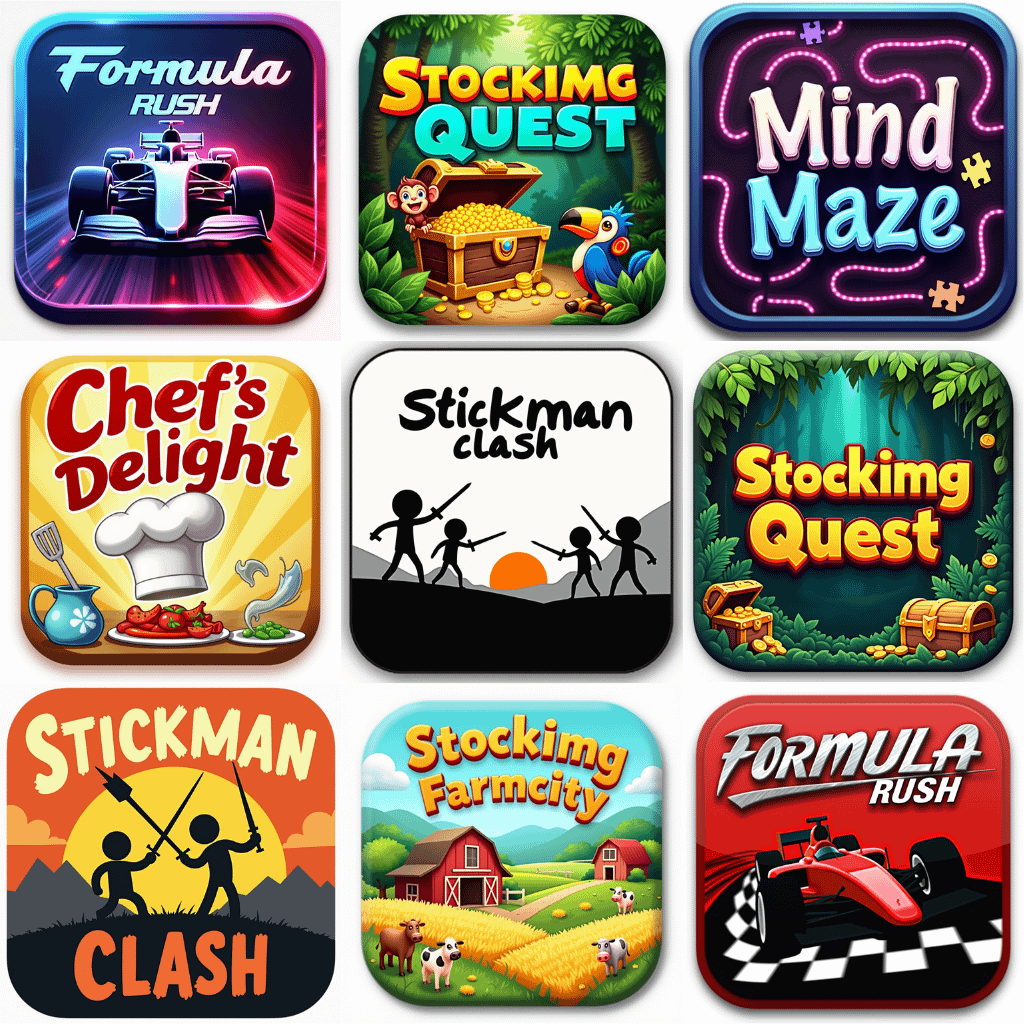
Seven icon packs worth buying
Okay, let's get down to business. Here are seven of the best AI-generated icon packs available to indie developers in 2026, as of late 2026. I’ve tried to include a mix of styles and price points, focusing on packs that offer good value and flexibility. These aren't just collections of images; they’re potentially game-changing assets.
Pixel Perfect Icons (RetroDev): This pack specializes in pixel art icons, ranging from 16x16 to 32x32. It's fantastic for retro-style games or projects aiming for a nostalgic vibe. Supported styles include classic RPG, platformer, and top-down shooter aesthetics. Pricing is $29 for a standard license, which covers use in commercial projects. They’ve also integrated a style consistency filter, which is a huge plus.
Fantasy Forge Icons (Aether Studios): Aether Studios has created a stunning collection of fantasy-themed icons, perfect for RPGs, adventure games, and strategy titles. The pack includes icons for weapons, armor, potions, creatures, and more. They offer a unique 'prompt refinement' service, where you can request modifications to existing icons for a small fee. Pricing: $49 for a commercial license.
Sci-Fi Command Icons (Nova Designs): If you're building a sci-fi game, this pack is a must-have. It features a wide variety of futuristic icons, including spaceship components, energy weapons, and alien artifacts. Nova Designs is known for its attention to detail and its commitment to quality. Price: $39.
Minimalist UI Icons (Iconify AI): Sometimes, less is more. Iconify AI’s minimalist pack provides clean, simple icons that are perfect for modern user interfaces. These icons are designed to be scalable and adaptable to different screen resolutions. They’re a great choice for mobile games or projects with a streamlined aesthetic. Price: $19.
Cartoon Chaos Icons (Funky Pixel): This pack is all about bright colors, exaggerated shapes, and playful designs. It’s ideal for casual games, children’s games, or any project that needs a touch of whimsy. Funky Pixel offers a unique "style matching" feature, which helps ensure consistency across all of your assets. Price: $25.
Horror Haunt Icons (GrimTech): For those venturing into the realm of horror, GrimTech's pack delivers chilling icons depicting spooky creatures, eerie environments, and unsettling objects. The icons are designed with a dark, atmospheric aesthetic. Price: $35.
Universal Game Icons (AI Asset Hub - Free): AI Asset Hub offers a surprisingly good free pack, covering a broad range of game elements. While the resolution isn’t as high as some of the premium options, and the style is a bit more generic, it’s a fantastic starting point for prototyping or developers on a very tight budget. Licensing is Creative Commons Zero (CC0), meaning you can use the icons for any purpose without attribution.
Essential Tools for Enhancing Your AI-Generated Game Icons

Large drawing area for detailed work · Pressure-sensitive Pro Pen 3 for natural drawing · Bluetooth connectivity for wireless freedom
This professional tablet offers precise control and a large canvas, perfect for fine-tuning and customizing AI-generated icons.
Access to over 20 industry-standard creative apps · 100GB of cloud storage for project management · Cross-platform compatibility for Mac and PC
Adobe Creative Cloud provides a comprehensive suite of tools essential for editing, animating, and integrating AI-generated assets into game projects.

Beginner-friendly, step-by-step instructions · Covers essential features of Affinity Designer v2 · Focuses on practical application for designers
This manual is a great resource for learning Affinity Designer, a powerful and affordable alternative for refining and preparing AI-generated icons.
Introduces fundamental game development concepts · Guides users through creating their first games · Suitable for absolute beginners in game making
This book demystifies game development, making it easier for beginners to understand how to implement and utilize AI-generated icon packs effectively.
As an Amazon Associate I earn from qualifying purchases. Prices may vary.
The real cost of free assets
Free packs work for prototyping, but they usually fall apart when you scale them up. Most free assets I've tested are capped at 256x256, which looks blurry on modern displays. If you need 4K compatibility or specific source files, you'll have to pay.
Another trade-off is style variety. Free packs tend to be more limited in terms of the number of styles and themes they offer. You might find a pack that’s great for fantasy icons, but lacks options for sci-fi or modern designs. Licensing is also a crucial consideration. While many free packs are released under permissive licenses like CC0, it’s always important to double-check the terms before using an asset in a commercial project.
Premium packs, on the other hand, offer higher quality, greater variety, and more robust licensing. You’ll typically get icons in multiple resolutions, with a wider range of styles and themes. Premium licenses usually grant you full commercial use rights, allowing you to freely use the icons in your game without worrying about legal issues. The cost can range from $20 to $50+ per pack, but the investment can be well worth it if you need professional-quality assets.
- Free packs: These usually have lower resolution and generic styles that might not fit a specific niche.
- Premium Packs: Higher resolution, wider variety, commercial-use licenses.
Free vs. Premium AI-Generated Game Icon Packs: A Quick Comparison (2026)
| Feature | Free Assets | Premium Assets |
|---|---|---|
| Resolution | Generally Low to Medium 🎨 | Medium to High 🖼️ |
| Style Variety | Limited – often leans towards common aesthetics | High – broader range of styles and artistic direction |
| Licensing | Often restrictive; requires careful review. May include attribution requirements. | Typically more permissive; commercial use often allowed with clear terms. |
| Support | Limited or Non-existent. Community support may be available. | Dedicated support channels (e.g., email, forums) are common. |
| Customization | Very Limited – often fixed assets with little to no editing capability | Medium to Full – options for color adjustments, minor edits, or requests for variations may be available. |
| Consistency | Can be inconsistent across a pack. ⚠️ | Generally High – more cohesive visual style within a pack. |
| Uniqueness | Lower – higher chance of encountering similar icons elsewhere. | Higher – greater potential for original and distinctive assets. |
Illustrative comparison based on the article research brief. Verify current pricing, limits, and product details in the official docs before relying on it.
The struggle with style drift
The hardest part is making sure your health potion icon doesn't look like it belongs in a different game than your mana potion. AI models drift. Even using the exact same seed and prompt, you'll often see shifts in line weight or lighting that break immersion.
To mitigate this issue, it’s important to be as specific as possible with your prompts. Use consistent keywords and descriptors, and experiment with different phrasing. Consider using a style reference image to guide the AI’s generation process. Post-processing is also crucial. Use a graphics editor to adjust the colors, contrast, and details of the icons to ensure they blend seamlessly together.
Some AI tools now offer features like style transfer or inpainting, which can help you refine and standardize your assets. Style transfer allows you to apply the style of one image to another, while inpainting lets you edit specific areas of an image without affecting the rest. Careful curation and editing are key. Don't just blindly use the first icon the AI generates; take the time to select and refine the best options.
Tools for Refining AI Icons
Even the most impressive AI-generated icons often need a little polish. Fortunately, there’s a wealth of tools available to help you refine your assets. For pixel-level editing and detailed adjustments, Photoshop and GIMP are industry standards. Both offer a comprehensive set of features for manipulating images, including color correction, layering, and masking.
If you need to create or edit vector graphics, Inkscape and Affinity Designer are excellent choices. Vector graphics are scalable without losing quality, making them ideal for icons and UI elements. For AI-powered refinement, consider tools like Gigapixel AI for upscaling images, or Remini for enhancing details. These tools can help you improve the quality of low-resolution icons.
There are also emerging AI tools designed specifically for inpainting and style transfer. These tools can automate some of the more tedious aspects of asset refinement, saving you time and effort. Many of these tools are available as plugins for Photoshop or as standalone applications, and many offer free tiers or trials.
Licensing and Legal Considerations
This is where things get serious. Using AI-generated assets doesn’t absolve you of legal responsibility. It’s crucial to understand the licensing terms associated with each asset before using it in your game. Different licenses grant different rights and impose different restrictions. Common licenses include Creative Commons (CC0, CC BY, CC BY-SA), commercial use licenses, and royalty-free licenses.
Always read the license agreement carefully. Pay attention to restrictions on commercial use, attribution requirements, and any limitations on modification or distribution. The risk of copyright issues with AI-generated content is a growing concern. If the AI was trained on copyrighted material, there’s a potential that the generated assets could infringe on those copyrights.
To minimize legal risks, choose assets from reputable sources with clear licensing terms. Document your sources and keep a record of the licenses you’ve obtained. If you’re unsure about the legality of an asset, it’s always best to err on the side of caution and seek legal advice. A little due diligence can save you a lot of trouble down the road.


No comments yet. Be the first to share your thoughts!