
Pixel Art's Unexpected Comeback
Pixel art is making a strong comeback in gaming, surprising many in an industry focused on photorealism. This trend goes beyond simple nostalgia. While classic games like Super Metroid and Chrono Trigger are part of it, the appeal is more complex.
Performance is a practical advantage. Pixel art needs less processing power than 3D graphics, which is great for indie developers with tight budgets. This lowers the entry barrier, letting smaller teams make visually appealing games without huge costs. It's also an artistic choice; the medium's limits push for creative solutions and a distinct look.
This retro trend isn't just in gaming; it's influencing music, fashion, and film too. Embracing past styles offers an alternative to the constant chase for new technology. Stardew Valley shows how pixel art creates a cozy feel, and Hollow Knight uses it for deep atmosphere and strong character design. These games prove pixel art is still relevant.
Developers today aren't just recreating the past; they're reinterpreting it. Many games mix pixel art with modern mechanics and design, creating experiences that feel both familiar and new. This approach has been very successful, drawing a wide audience and renewing interest in the style.
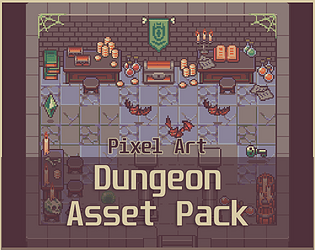
Itch.io's Pixel Art Hotspot
Itch.io is a key marketplace for pixel art assets, serving as a hub for creators and developers. Its open nature and low entry barriers make it easy for artists to show and sell their work directly to gamers. This connection builds a supportive environment and allows for more personal interactions.
Itch.io offers a wide range of assets. You can find character sprite packs, tilesets for environments, icons for user interfaces, and background elements. The search, along with 'Icons' and 'Pixel Art' tags, makes finding content straightforward. The tagging system allows specific searches, like “16x16 pixel art icons” or “fantasy character sprite pack”.
The community is a big part of Itch.io. It encourages collaboration and support among indie developers. Many artists interact with buyers, offering customization or help with integration. While exact sales data for pixel art isn't public, the large volume of assets and steady new releases point to a healthy, growing market.
- Character Sprites: Ranging from simple 8x8 sprites to more detailed 32x32 or 64x64 designs.
- Tilesets: Complete sets of tiles for creating 2D environments.
- Icons: Small graphics for representing items, actions, and UI elements.
- Backgrounds: Pre-made background images for various game settings.
Pixel Art Asset Creators
- Pixel Joe - Specializes in detailed 16-bit style sprites and tilesets, often focusing on RPG and platformer assets. Their work is known for vibrant color palettes and expressive character animations.
- GrafxKid - Offers a wide range of pixel art, including character sprites, backgrounds, and UI elements, frequently in a smaller, more minimalist style reminiscent of early Game Boy games.
- PrismaticaDev - Creates assets with a focus on fantasy and sci-fi themes. Their style often incorporates dithering and shading techniques to create depth in low resolutions.
- Lost Relic Games - Provides comprehensive asset packs, particularly for top-down RPGs and adventure games, including characters, environments, and props. Assets often feature a consistent aesthetic suitable for larger projects.
- itchyPea - Known for a diverse collection of pixel art, ranging from simple icons to more complex scene assets. Their work is often characterized by a clean, readable style.
- Heartbit Loot - Focuses on creating pixel art assets for visual novel and RPG Maker projects. They offer character sprites, tilesets, and UI elements tailored for these engines.
- MolleIndustria - Offers a distinctive style leaning towards a darker, more atmospheric aesthetic, often used in horror or mystery-themed games. Their assets include character sprites, tiles, and props.
CraftPix.net: Premium Asset Quality
CraftPix.net stands out from platforms like Itch.io by focusing on high-end, professional 2D game assets. While Itch.io has many styles and prices, CraftPix.net usually has assets with a more polished, consistent look. This often means a higher price, reflecting more detail and refinement.
Asset quality on CraftPix.net is usually higher, focusing on consistency and usability. They offer various licenses, from personal to commercial use with different restrictions. Developers must carefully check license terms before buying to ensure they fit project needs. Standard licenses often allow use in multiple projects but may restrict asset redistribution.
It's hard to know if CraftPix.net has exclusive assets without deep research. However, they often have curated collections and bundles not easily found elsewhere. The site's categories like 'Game Kits', 'Sprites & Characters', and 'GUI Backgrounds' help with focused browsing. They also offer game kits with multiple asset types for a cohesive project start.
Top Sprite Packs of 2026
To pick standout sprite packs, consider artistic style, versatility, and value. Here are some examples popular in 2026, covering various genres and aesthetics. Prices are from late 2024 and may change.
"Heroic Fantasy Characters" by Pixelated Polyhedra (Itch.io - $25): A comprehensive pack featuring over 60 fully animated sprites of knights, mages, and rogues, ideal for RPGs. The art style is detailed and expressive, with a strong emphasis on dynamic poses. This pack is a solid foundation for a classic fantasy adventure.
"Cyberpunk City Tileset" by GrafxQuest (CraftPix.net - $49): A meticulously crafted tileset featuring a sprawling cyberpunk cityscape. Includes buildings, streets, vehicles, and props, perfect for creating immersive urban environments. The isometric perspective adds a unique visual flair.
"Space Explorers" by StellarSprites (Itch.io - $15): A charming collection of astronaut and alien sprites, suitable for sci-fi adventure or platformer games. The sprites are designed with a whimsical and colorful aesthetic.
"Dungeon Crawler Icons" by IconSmith (CraftPix.net - $29): A large set of icons covering common dungeon elements – potions, weapons, treasure chests, monsters. Designed for clarity and readability, even at small sizes.
"Top-Down Forest Pack" by WildBrush Studio (Itch.io - $18): A versatile pack containing tiles, sprites, and props for creating lush forest environments. Includes animated trees, bushes, and wildlife.
'Pixel Platformer Heroes' by Retro Realms (CraftPix.net - $35): This pack focuses on highly animated platformer heroes, with run, jump, attack, and idle animations. The sprites are designed for smooth movement and responsiveness.
'Medieval Village Tileset' by Stone Age Art (Itch.io - $22): A detailed tileset for creating medieval villages, castles, and towns. Includes a variety of buildings, props, and environmental elements.
'Sci-Fi UI Pack' by FutureTech Designs (CraftPix.net - $39): A comprehensive UI pack with buttons, menus, icons, and HUD elements designed for sci-fi games. The sleek and futuristic aesthetic complements a wide range of sci-fi settings.
Essential Pixel Art Tools for Retro Game Development
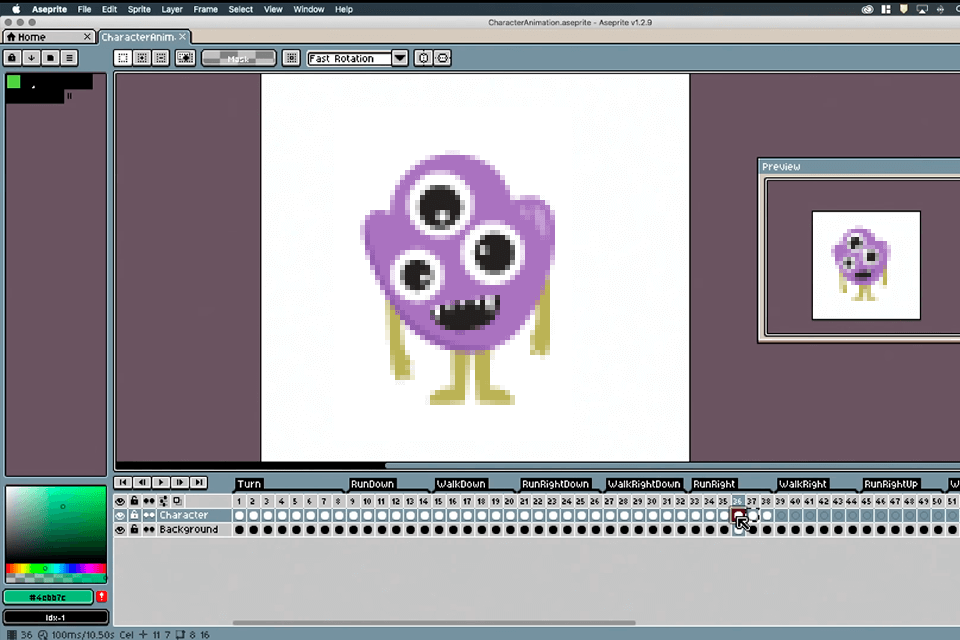
Advanced layer and animation tools · Customizable brushes and palettes · Tilemap editor
Aseprite is a widely adopted and powerful software specifically designed for pixel art creation, offering robust tools for animation and sprite design.

AI-powered image generation · User-friendly interface · Beginner-focused tutorials
Pixel by Pixel leverages AI to simplify visual design, making it accessible for beginners to experiment with pixel art creation without extensive technical knowledge.

Pressure-sensitive pen technology · Multi-touch gestures · Compact and portable design
The Wacom Intuos Pro offers precise control and a natural drawing experience, essential for detailed pixel art work and digital illustration.

Comprehensive suite of creative applications · Cloud storage and collaboration features · Regular updates and new features
Adobe Creative Cloud provides industry-standard software like Photoshop and Illustrator, which are versatile tools for both creating and editing pixel art assets.
As an Amazon Associate I earn from qualifying purchases. Prices may vary.
Beyond Characters: Icons and UI
Character sprites get a lot of attention, but consistent pixel art for UI elements is just as important. Icons, buttons, menus, and HUDs should blend with the overall look, creating a cohesive visual experience. Inconsistent UI can break immersion and hurt the game's quality.
Making readable, appealing pixel art UI has unique challenges. Low resolution means careful thought about shape, color, and contrast. Good use of color palettes is key for clear visual hierarchy and guiding the player's eye. A well-chosen palette also adds a lot to the game's atmosphere and mood.
UI asset packs are easy to find, offering pre-designed elements that match a consistent pixel art style. These packs can save developers a lot of time and effort, ensuring a professional look for their game's interface. It's vital to consider the overall color scheme and make sure it fits the game's world.
Tools of the Trade: Software & Techniques
Several software options work for pixel art. Aseprite is popular, made for pixel art and animation, with features like tilemap editing and animation timelines. Photoshop and GIMP are general image editors usable for pixel art, but need more manual setup. Pyxel Edit is another dedicated pixel art editor known for being simple and easy to use.
Key techniques include dithering, which creates the illusion of more colors by placing pixels of different shades. Anti-aliasing smooths jagged edges by blending colors, but needs careful use in pixel art to avoid blurring. Color cycling subtly shifts pixel colors over time for animation or visual interest.
Many online resources offer tutorials for learning pixel art. Websites like Lospec provide detailed information on color palettes, techniques, and software. PixelJoint is a community forum where artists share work and give feedback.
Standout Artists to Watch
Besides asset pack creators, several artists are pushing pixel art with their own projects. Paul Robertson is known for his detailed pixel art landscapes and character designs. His work often blends realism with stylized aesthetics.
eBoy is a collective known for intricate isometric pixel art cityscapes. Their work has a high level of detail and a distinctive style. They've influenced many designers and continue
Brandon James Greer creates atmospheric and evocative pixel art environments, often inspired by nature and fantasy. His work demonstrates a masterful understanding of color and composition. You can find his work on X (formerly Twitter) and his personal website.
Future Trends in Pixel Art
The future of pixel art likely involves continued experimentation with resolution and color palettes. We might see more games utilizing higher-resolution pixel art, blurring the lines between pixel art and traditional 2D graphics. The exploration of unconventional color palettes and shading techniques could also lead to new and visually striking aesthetics.
The potential impact of AI tools on pixel art creation is uncertain. While AI-assisted tools could automate certain tasks, such as generating variations of sprites, the artistic vision and creative control will likely remain with the human artist. It’s possible that AI could be used to upscale pixel art or to create new textures and patterns.
Pixel art’s enduring appeal suggests it will continue to evolve and adapt. The style’s versatility and accessibility ensure its relevance in the gaming industry for years to come. The future likely holds a blend of nostalgia and innovation, as artists continue to reimagine and redefine the possibilities of this classic art form.
No comments yet. Be the first to share your thoughts!