
Beyond Flat: The Shift to Volumetric Icons in VR
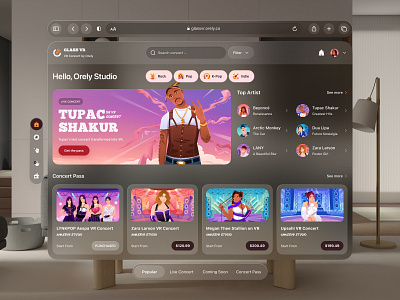
For too long, we’ve been shoehorning 2D UI elements into 3D spaces. It's a compromise that, frankly, feels increasingly jarring as VR hardware gets better. Flat icons, perfectly fine on a monitor, lose all their impact when you’re inside the game world. They lack presence, they don’t interact with the environment’s lighting, and they generally feel… pasted on. The Meta Quest 4, with its higher resolution and improved processing power, is really going to amplify this problem if developers don’t move beyond flat design.
The solution? Volumetric icons. These aren’t just 2D images with a depth map; they’re genuinely 3D objects that exist within the VR space. This means they can be occluded by other objects, cast shadows, and be viewed from any angle. Early experiments, like those seen in Lone Echo with its detailed cockpit interfaces, demonstrated the potential, but also the challenges. Creating these assets is more complex, and performance optimization is a hard requirement.
Initially, the biggest hurdle was the sheer computational cost. Rendering complex 3D models for every UI element could easily bring a VR experience to its knees. Developers had to get creative with techniques like level of detail (LOD) scaling and aggressive culling. But with the increased power of the Meta Quest 4, and advances in rendering techniques, we’re finally at a point where volumetric icons are becoming a truly viable option for a wider range of VR games. It’s not just about looking good; it’s about making the UI feel like a natural part of the world.
What’s driving this shift beyond just the hardware? It’s the need for reduced cognitive load. A flat icon requires your brain to consciously interpret it as an element separate from the world. A volumetric icon, because it is part of the world, requires less mental effort to process. That extra mental bandwidth allows players to stay more immersed in the experience.
Materiality and Texture: Bringing Icons to Life
Depth alone isn’t enough. A volumetric icon made of a single, uniform material will still feel… lifeless. The key is to imbue these icons with materiality – to make them feel like they’re constructed from believable substances. Think about the difference between a metal button, a glass panel, and a wooden lever. Each material has a distinct visual and tactile quality that contributes to the overall impression.
Choosing the right materials reinforces the game’s aesthetic. A sci-fi game might lean heavily on brushed metal, glowing energy fields, and holographic projections. A fantasy game might favor wood, stone, and leather. The materials should feel consistent with the world and the narrative. But be careful – overly complex materials can quickly tank performance. Standard texture libraries provide a starting point, but these require optimization for VR.
Optimization is where things get tricky. Using high-resolution textures and complex shaders can look stunning, but it can also lead to frame rate drops. Techniques like texture atlasing, normal map baking, and shader simplification are essential for maintaining smooth performance. Consider using physically based rendering (PBR) materials, but be mindful of the performance cost. PBR offers a more realistic look, but it requires more computational power.
I’ve seen some interesting approaches using subtle surface imperfections to add realism. A slightly scratched metal surface, or a grain in the wood, can make a huge difference in how believable the icon feels. It’s the little details that often make the biggest impact. Don’t underestimate the power of a well-chosen material.
Spatial Audio Integration: Icons That 'Sound' Immersive
We tend to think of VR UI as a purely visual experience, but that's a mistake. Audio is just as important, and it's often overlooked. Integrating spatial audio cues with volumetric icons can dramatically enhance the sense of immersion. Imagine reaching out and "touching" a metal icon, and hearing a subtle metallic clang. Or activating an energy shield and hearing a satisfying whoosh.
Proximity-based audio works well here. The volume and spatialization of the sound should change based on the player's distance from the icon. Material-specific sounds are also important. Different materials should have different sonic characteristics. A glass icon might produce a higher-pitched chime, while a stone icon might produce a lower-pitched thud.
Subtle ambient sounds can also reinforce the icon’s presence. A glowing energy icon might emit a faint humming sound, or a mechanical icon might have a subtle whirring noise. These sounds shouldn't be intrusive, but they should be noticeable enough to add to the overall sense of immersion. Custom foley or specialized spatial libraries are better starting points than generic icon sites.
I'm not sure we’ve even begun to scratch the surface of what’s possible with spatial audio and VR icons. It’s a relatively unexplored area, and I’m excited to see what developers come up with in the coming years. The potential to create a truly multi-sensory UI experience is enormous.
Dynamic Icons: Responding to User Interaction and Game State
Static icons are, well, static. They don’t provide any feedback to the player, and they can quickly become visually boring. Dynamic icons, on the other hand, respond to user interaction and the game’s state, making the UI feel more alive and engaging. Think of a health icon that pulses when the player is taking damage, or an inventory icon that visually updates when the player picks up a new item.
Subtlety is key here. Overly flashy animations can be distracting and even disorienting in VR. The goal is to provide clear and concise feedback without overwhelming the player. A gentle glow, a subtle scale change, or a brief color shift can be much more effective than a complex animation sequence. Remember, you’re trying to enhance immersion, not break it.
Consider how icons can visually "charge up" before an action. A weapon icon might glow brighter as the player charges a shot, or a teleport icon might build up energy before initiating a teleport. These visual cues can provide valuable feedback to the player and make the experience more satisfying. Flaticon has a solid collection of animated icons, though many will need adaptation for a volumetric approach.
The challenge is finding the right balance between visual feedback and performance optimization. Dynamic icons require more processing power than static icons, so it’s important to use them judiciously. Prioritize the most important icons and use simpler animations for less critical elements.
Accessibility Considerations for VR Iconography
VR presents unique accessibility challenges, and icon design is no exception. Traditional accessibility guidelines don’t always translate well to immersive environments. It’s crucial to design icons that are usable by players with a wide range of visual and physical abilities. Icon size is a major factor. Icons that are too small can be difficult to see, especially for players with visual impairments.
Contrast is also important. Icons should have sufficient contrast against the background to be easily distinguishable. Avoid using color combinations that are difficult for colorblind players to differentiate. Providing alternative color schemes is a good practice. Consider offering options to adjust icon size and contrast in the game’s settings.
Alternative input methods are also essential. Not all players will be able to use motion controllers. Support for gamepad and voice control is crucial. Ensure that icons can be easily selected and activated using these alternative input methods. It’s a surprisingly overlooked area, but making your game accessible to a wider audience is not only ethical, it’s good business.
The industry still has a long way to go with VR accessibility. We need standardized kits for high-contrast volumetric shapes to ensure everyone can play.’s an area that needs more attention and research. Developers need to prioritize inclusivity and design with accessibility in mind from the very beginning.
Tools and Techniques: Software and Workflows for VR Icon Creation
Creating volumetric icons requires a different skillset and workflow than designing traditional 2D icons. Blender is a popular choice for modeling and texturing these assets. Its open-source nature and powerful feature set make it an attractive option for many developers. Unreal Engine and Unity are the dominant game engines, and both offer robust tools for importing and manipulating 3D models.
Sculpting is a common technique for creating organic-looking icons. Software like ZBrush or Mudbox allows you to sculpt detailed models with a high degree of precision. Procedural generation can be used to create more complex and intricate icons, but it requires a deeper understanding of programming and algorithms. Shader creation is essential for adding visual effects and making the icons look realistic.
Workflow-wise, many developers start by creating a low-poly base mesh in Blender, then sculpting the details in ZBrush. They then bake the high-poly details onto the low-poly mesh to create normal maps and other texture maps. Finally, they import the model into Unity or Unreal Engine and apply the appropriate materials and shaders.
I've been hearing a lot of buzz about Substance 3D Designer and Painter. These tools allow you to create and edit materials in a non-destructive way, which can be a huge time-saver. Experiment with different workflows and find what works best for your team and your project. Don’t be afraid to try new things.
- Blender: Modeling, texturing, and animation.
- ZBrush/Mudbox: Sculpting detailed models.
- Substance 3D Designer/Painter: Creating and editing materials.
- Unity/Unreal Engine: Importing, manipulating, and rendering 3D models.
VR Icon Creation Software Comparison - 2026 Outlook
| Software | Ease of Use | Cost | Feature Set | VR Export Capabilities | Community Support |
|---|---|---|---|---|---|
| Blender | Medium | Low | High | Medium | High |
| Unity | Medium | Low (with limitations) | Medium | High | Very High |
| Unreal Engine | Low | Low (royalty-based) | High | High | High |
| Substance Designer | Low | High | High | Medium | Medium |
Illustrative comparison based on the article research brief. Verify current pricing, limits, and product details in the official docs before relying on it.
The Future of VR Icons: AI-Assisted Design and Personalized UI
The future of VR icon design is likely to be shaped by two major trends: AI-assisted design and personalized UI. AI tools are already starting to emerge that can generate or optimize icons based on specific parameters. Imagine being able to simply describe the icon you want, and having an AI tool create it for you automatically. This could significantly speed up the development process and reduce costs.
Personalized UI takes things a step further. It involves tailoring the UI elements to the individual user’s preferences and playstyle. For example, a player who prefers a minimalist aesthetic might see simpler icons, while a player who prefers a more detailed look might see more complex icons. AI could be used to analyze the player’s behavior and automatically adjust the UI accordingly.
Another possibility is dynamic icon generation based on the game’s narrative. Icons could evolve over time to reflect the player’s progress and choices. This would create a more immersive and engaging experience. The challenge will be balancing personalization with usability. It’s important to ensure that the UI remains clear and intuitive, even when it’s customized.
It's speculative, of course, but I think we're on the cusp of a major shift in how VR UIs are designed. AI and personalization have the potential to create truly immersive and engaging experiences. The next few years will be fascinating to watch.
Meta Platforms Inc Price Prediction 2026
Bull / Base / Bear scenario analysis
| Timeframe | Bull Case | Base Case | Bear Case | Key Driver |
|---|---|---|---|---|
| 1 Month | $585 | $565 | $525 | Quest 4 launch momentum and VR market expansion |
| 3 Months | $620 | $580 | $510 | Holiday VR sales performance and developer ecosystem growth |
| 6 Months | $680 | $610 | $485 | Reality Labs revenue trajectory and AI integration success |
| 1 Year | $750 | $650 | $450 | Metaverse monetization breakthrough and VR mainstream adoption |
Price Prediction Summary
META's price outlook is tied to VR/AR adoption rates and Reality Labs profitability. The Quest 4 launch and expanding VR gaming ecosystem could drive significant upside, though high R&D costs and competitive pressure remain concerns.
Key Factors Affecting Meta Platforms Inc Stock Price
- Quest 4 market reception and sales volume
- Reality Labs path to profitability
- VR gaming ecosystem and developer adoption
- AI-powered content creation tools market growth
Disclaimer: Predictions are speculative and not financial advice. Stock price predictions are based on current market analysis and may vary significantly due to market volatility, economic conditions, and other unpredictable factors. Always do your own research before making investment decisions.
Resources and Inspiration: Where to Find High-Quality VR Assets
Finding high-quality VR assets can save you a lot of time and effort. Spawn Icon, naturally, is a great place to start. We specialize in providing premium gaming icons, character sprites, and digital assets for game developers and designers. The Unity Asset Store and the Unreal Engine Marketplace are also excellent resources, offering a wide range of assets, including 3D models, textures, and shaders.
Don’t underestimate the power of inspiration. Look at games that have exceptional UI design and analyze what makes them work. Superhot VR is a great example of a game that uses minimalist UI elements to create a unique and immersive experience. Moss is another standout title, with its charming and intuitive interface.
Websites like Adobe Stock and ArtStation can also be valuable sources of inspiration. And don’t forget to explore online communities and forums dedicated to VR development. Sharing ideas and getting feedback from other developers can be incredibly helpful.
Ultimately, the best way to create amazing VR icons is to experiment, iterate, and learn from your mistakes. Don’t be afraid to try new things and push the boundaries of what’s possible. The future of VR is in your hands.
HarmonyOS 6.1 Immersive Light Sensation - Tab Glass Material Details#Build328 #SP52 #Update #HarmonyOS6 #Beta #Pollen #ClosedBeta #HarmonyOS #Huawei #Immersive #UI #Design pic.twitter.com/mHrPzFLsod
— Living In Harmony ⭕🔥🥉🏅🕊🦾🆙🆗🎯🔑💼🛡️👑🇨🇪🇺 (@LivingInHarmony) March 29, 2026


No comments yet. Be the first to share your thoughts!